> ## Documentation Index
> Fetch the complete documentation index at: https://docs.papermap.ai/llms.txt
> Use this file to discover all available pages before exploring further.
# Create and version an agent
> Bind immutable instructions, model access, approved tools, and limits into an active AIR agent version.
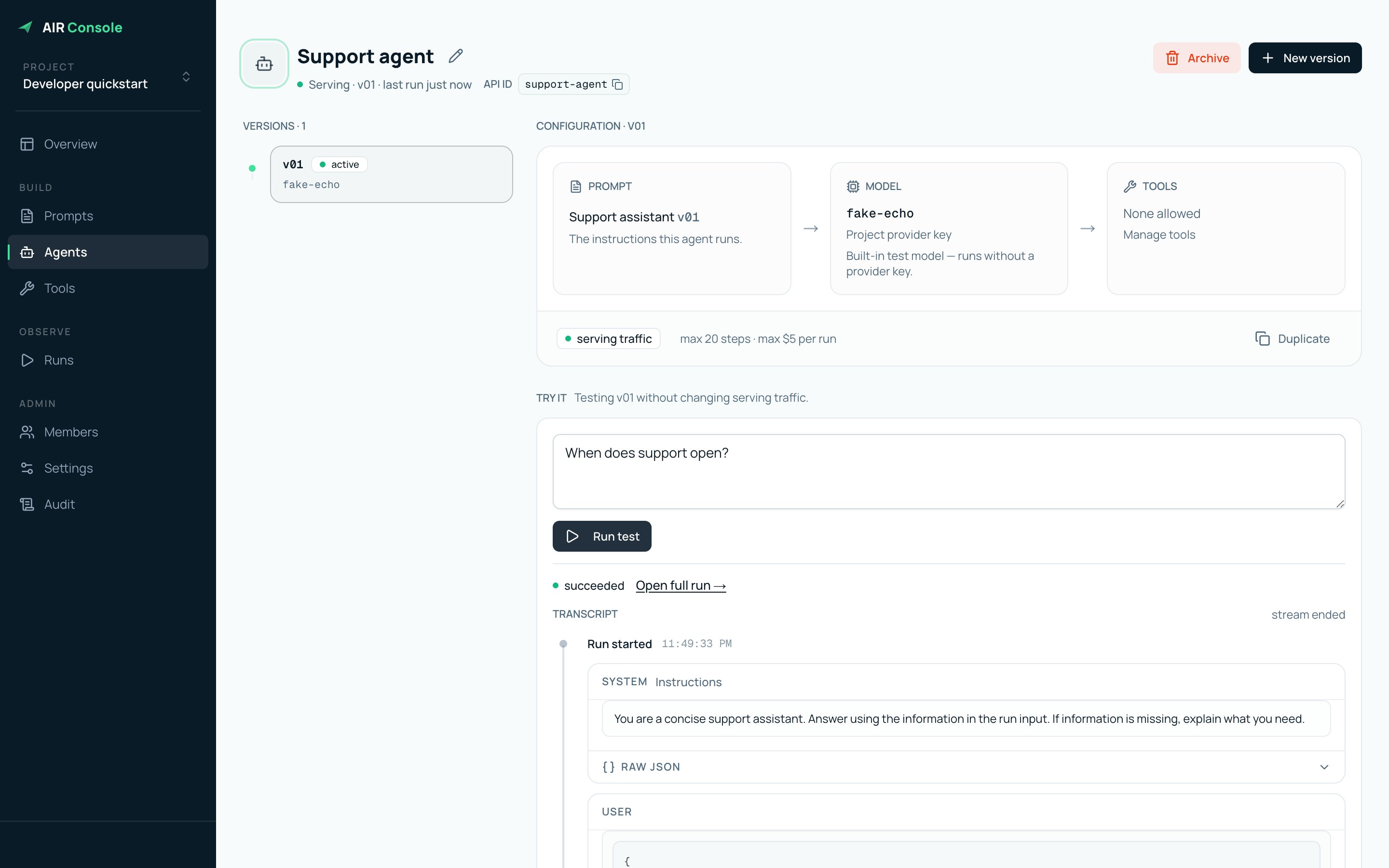
An agent is the stable identity your application calls. An agent version is the
immutable configuration AIR executes: prompt, model, tools, fallbacks, output
contract, and limits.
## Build the first version
Save reusable instructions under **Prompts**, or write new instructions
directly in the agent composer.
Use a Papermap-managed model when available, connect an OpenAI or Anthropic
provider key, or use `Testing → fake-echo` for a zero-credential staging
smoke test.
Open **Advanced — fallback models, tools, output, and limits** and add only tools
this version should call. Project-level enablement does not grant an agent
access automatically.
Leave **Output schema** blank for free-form text, or provide an object-rooted
JSON Schema when your application needs predictable fields.
Select **Activate immediately** for a new agent, or create an inactive
version when you want to test before moving serving traffic.
 ## Return structured output
Add a JSON Schema under **Advanced → Output schema** when downstream code needs
a stable response contract. The schema must declare an object at the root.
```json theme={null}
{
"type": "object",
"properties": {
"answer": { "type": "string" },
"needs_human_review": { "type": "boolean" }
},
"required": ["answer", "needs_human_review"],
"additionalProperties": false
}
```
AIR sends the schema to supported model providers and validates the final model
response again before completing the run. A successful run stores the parsed
object directly:
```json theme={null}
{
"answer": "Order 1042 is scheduled for delivery tomorrow.",
"needs_human_review": false
}
```
If the final response is not valid JSON or does not match the schema, AIR marks
the run as `failed` and does not publish a successful final output. The raw
model response remains available in the run trace for debugging.
Without an output schema, AIR preserves the existing free-form response shape
with the model response under the `text` field.
## Test before integrating
The **Try it** panel creates a real run using the selected agent version. Open
the resulting trace to verify the exact configuration and model behavior.
## Return structured output
Add a JSON Schema under **Advanced → Output schema** when downstream code needs
a stable response contract. The schema must declare an object at the root.
```json theme={null}
{
"type": "object",
"properties": {
"answer": { "type": "string" },
"needs_human_review": { "type": "boolean" }
},
"required": ["answer", "needs_human_review"],
"additionalProperties": false
}
```
AIR sends the schema to supported model providers and validates the final model
response again before completing the run. A successful run stores the parsed
object directly:
```json theme={null}
{
"answer": "Order 1042 is scheduled for delivery tomorrow.",
"needs_human_review": false
}
```
If the final response is not valid JSON or does not match the schema, AIR marks
the run as `failed` and does not publish a successful final output. The raw
model response remains available in the run trace for debugging.
Without an output schema, AIR preserves the existing free-form response shape
with the model response under the `text` field.
## Test before integrating
The **Try it** panel creates a real run using the selected agent version. Open
the resulting trace to verify the exact configuration and model behavior.
 ## Change an agent safely
Create a new version whenever you change instructions, model, allowed tools,
output schema, or limits. Test it, then activate it. Existing runs remain tied
to the version with which they started; new runs use the active version.
Do not edit production behavior in place. Version first, test the version,
and then move serving traffic.
## Change an agent safely
Create a new version whenever you change instructions, model, allowed tools,
output schema, or limits. Test it, then activate it. Existing runs remain tied
to the version with which they started; new runs use the active version.
Do not edit production behavior in place. Version first, test the version,
and then move serving traffic.